
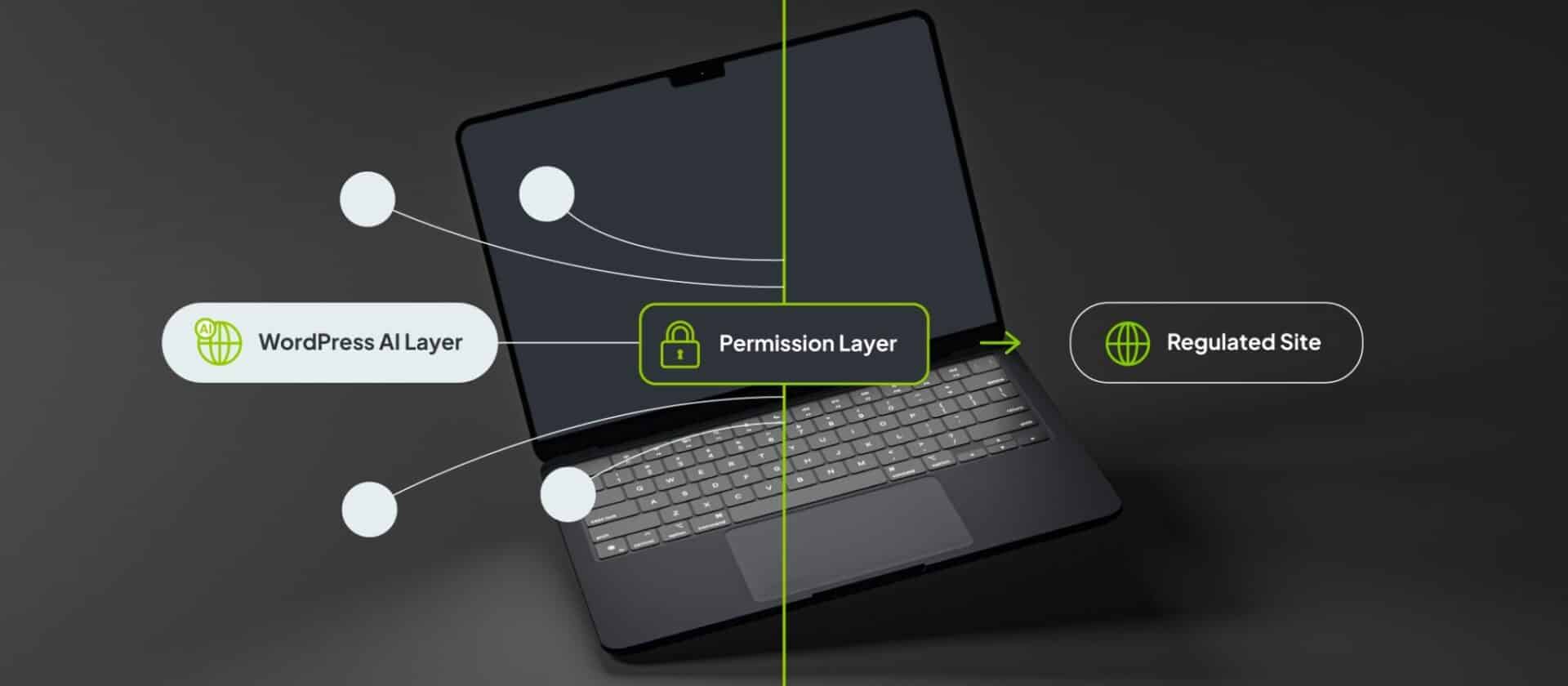
WordPress is building AI into the platform itself, and right now there are three different aspects of WordPress’s AI initiative that are taking shape in WordPress core: the Abilities API, a WordPress AI Client, and an MCP Adapter. These names sound technical, and the details that make up these integrations are tech heavy (although we know some people who make understanding them a lot easier). However the results of integrating these new initiatives in compliance-heavy digital operations are going to have a massive impact for anyone running content in regulated markets.
What we’re going to show you here is how these new features and AI capabilities create powerful building blocks designed to work inside the WordPress permission and review model.
What the Abilities API, WordPress AI Client, and MCP Adapter Do
For enterprise digital teams, the first question about any new AI feature or product is what risk is it posing if not implemented properly. Most AI features for WordPress so far arrived as plugins. Each new plugin connected to its own AI provider, added its own buttons, and made its own decisions about what a user could do with it.
These basic solutions are fine if you’re running a single site as a blog or single publishing operation. But they don’t work for a highly-governed estate with rigorous compliance demands. That’s because every new plugin that isn’t built to the required regulatory standards becomes one more thing to vet, and poses a new compliance risk if not implemented properly.
But WordPress is heading in a new direction that flips the balance of how core and plugins interact with each other. Instead of each plugin bringing its own AI, WordPress itself is creating a shared AI foundation and bringing powerful capabilities to the platform.

The Abilities API is a standard way to register what a site can do, as a defined list of actions. Think of an ability as a single, named task: create a draft, fetch a post, update a piece of metadata, run a search across your content. Each ability is registered once, described clearly, and tied to the same permission system WordPress already uses to decide who can do what. That last part is the important one. An AI tool does not get a master key. It gets the specific abilities you allow, for the specific users you allow, and nothing else.
The WordPress AI Client in WordPress 7.0 has a connector settings page in the admin area. Instead of every plugin writing its own integration with a different provider, they all draw on one common layer. In practice this means fewer moving parts to review, one place where model access is set, and less risk of a plugin editing, interacting with, or sending your content somewhere you never signed off on.
The MCP Adapter lets an outside AI assistant talk to your site through a shared standard called the Model Context Protocol. If your team ever wants an AI tool to work with the site directly, the adapter is the controlled door it comes through, and it only exposes the abilities you choose to make available so compliance and site governance are easier to manage.
None of this decides anything about your content on its own, and that’s the point. These are foundations that other tools build on while keeping your compliance measures in tact, and they carry your permission rules with them wherever they go.
How AI can improve compliance and governance at enterprise level
AI has been a hard sell to compliance teams, and the reason is that compliance teams need to know exactly where the control sits and how control is managed.
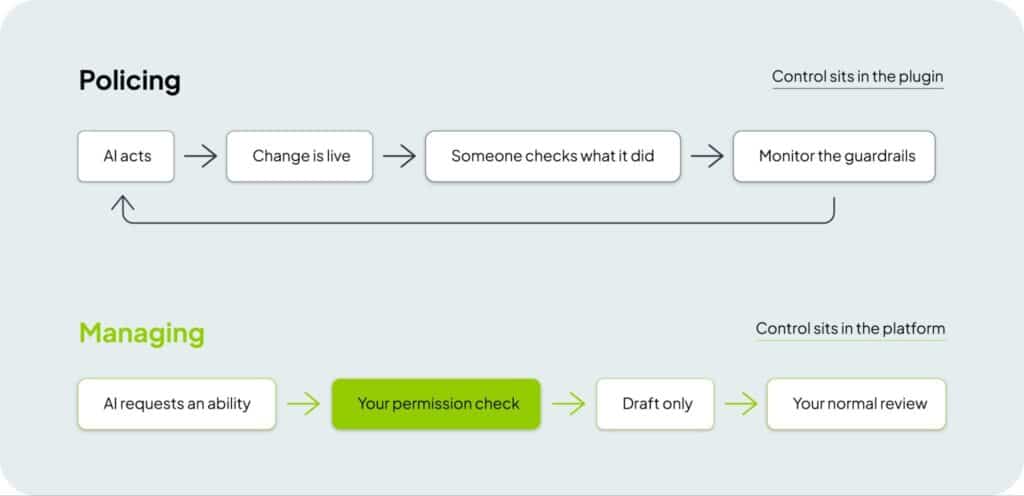
When an AI feature lives inside a plugin at the edge of your site, the control lives there too, in that plugin’s own settings, separate from your internal roles and your review flow. So you end up policing it after the fact or through an inefficient workflow. Someone has to check what it did, how it’s behaving and continually monitor its guardrails. This turns your review process into a safety net, which is exactly the setup an auditor does not want to see.
When AI works through the Abilities API instead, the control lives in the platform. An ability that only creates drafts cannot publish, because publishing is a different capability that needs to be granted. A user who cannot approve content in your normal workflow cannot approve it through an AI tool either, because it is the same permission being checked. The AI is not an exception to your governance. It is something that works alongside your governance parameters.
That is the difference between managing AI and policing it. One is built into how your platform operates, enabling greater AI integrations which don’t increase compliance risks. The other is a memo you hope everyone follows.
Answering AI concerns in regulated content
The first concern that comes with AI implementation and usage throughout a site is that AI will put content live or adjust content without review. On a platform-regulated model it will not, as long as the abilities you expose stop short of publishing. You can let an AI tool draft, suggest, reorganise, and tag, while leaving publishing and approval exactly where they are, with the people who hold those permissions today. But the gate does not move. This enables your teams to have more freedom to adopt and experiment with new AI tools and products, without increasing risk throughout your platform.
The second worry is that AI replaces human judgment in review. But Medical, Legal and Regulatory review exists because a person with medical, legal, and regulatory context has to make a call a model cannot. What AI can do is take work off the pile before it reaches that person: a cleaner first draft, a summary of what changed, a check that the required safety information is there. The reviewer still reviews. But platform-level governance just means reviewers spend less of the day on the mechanical parts and more on the judgment only they can make, which greatly improves team efficiency and execution speeds.
The third worry is about where your content goes. The answer depends on which model you connect and how it is set up. But the shared AI Client at least gives you one place to see and control that, instead of several plugins each making their own arrangement. It does not answer the question for you, but it makes the question answerable and adjustable.
How these WordPress AI capabilities enhance marketing activities at enterprise level

Set aside the parts that touch approval, and what’s left is real, everyday value that can be implemented immediately. An enterprise digital content team could reasonably use these AI capabilities to:
- Produce a first draft of non-promotional content faster, then send it into MLR exactly as they do now.
- Summarise long documents or pull the key points out of source material, so a person is editing rather than starting from a blank page.
- Prepare content for other markets by handling the first-pass groundwork before local review and adaptation.
- Keep metadata, tags, and internal categorisation consistent across a large estate, which quietly makes everything easier to find and govern.
- Surface content that has gone stale or is missing a required element, so nothing slips through just because the estate is too big to eyeball.
Every one of those sits before the review step, not in place of it. And your AI implementations and roadmaps earn their place by clearing the work that piles up in front of your reviewers, not by trying to do their job or slapping an AI tool on top of a disconnected system.
A low-risk way to introduce AI on a multi-market WordPress estate
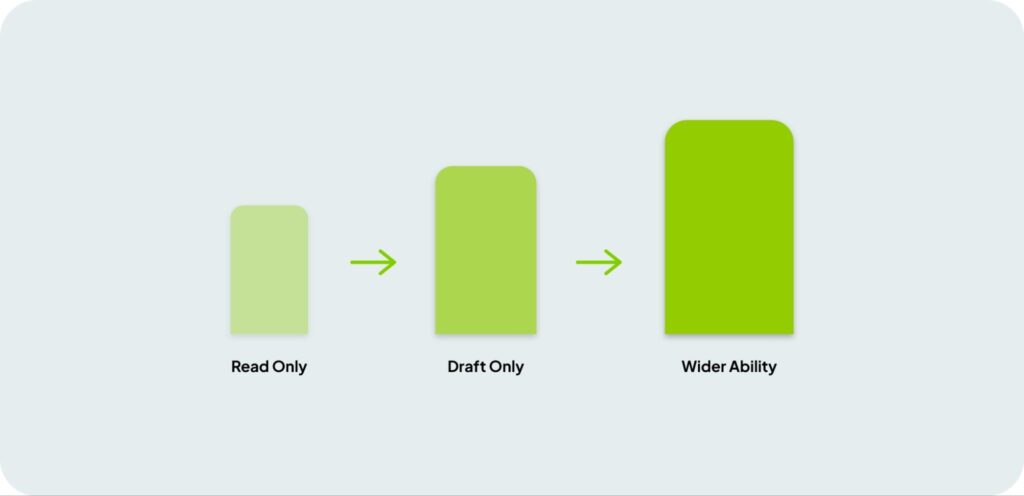
The sensible way in is to start by keeping your AI implementations narrow and reversible. Start with abilities that can only read or only draft, so the worst case is a suggestion nobody uses. Then you can start widening what you allow your AI tools to do as the team builds trust and irons out any flaws or hurdles with their implementations. Rather spend more time at the beginning to ensure your AI tools can work at their full potential instead of rolling out AI tools without any solid foundation and blindly hoping they make the transformation you’re looking for.
This approach works because the abilities are scoped and tied to your existing permissions, widening access later is a deliberate decision made based on how needs and gaps in your processes arise. You are not switching AI on across the whole site and then trying to contain it and building out new protocols and security measures later. You are opening one door at a time in a way that’s controlled and actionable.
As we’re currently seeing across the business world, the decision to add AI is less about the content on it’s own and more about the architecture behind it. Poor implementations end up costing organizations more than they save, burning out staff, and leading to security and compliance risks. Rolling out AI across an organization only works if it runs on foundations that respect your review model, and WordPress is now building those foundations into the core platform itself.
Our advice is to build AI on seemingly primitive foundations that carry your rules with them and keep the review gate exactly where it is. This makes staying compliant easier, but, as we mentioned earlier, it also gives your teams more freedom to experiment with new tools and attempt new AI breakthroughs without jeopardizing your compliance or governance standards.
As more and more organizations try to find new ways to utilize the incredible AI tools we have available to us, more and more organizations are also realizing that without a solid foundation, these tools add more bloat and risk, instead of more efficiency and productivity. WordPress is solving this by giving the core platform better guardrails for organizations to adjust to their needs and we’re already seeing more and more enterprise clients realizing their AI goals without the cost and compliance downsides others are currently facing.
Want to stay compliant while adding AI to your regulated estate?
Explore the bespoke, multi-market WordPress solutions we build for enterprises across the globe.
WordPress for Enterprise: We use Multisite to build the architecture, governance, and platform strategy behind complex, multi-market digital portfolios, including the permission and review model that decides how AI tools can be used and implemented in your estate.
Custom Integrations: Connect your platform to the systems your approved content already lives in, from Veeva PromoMats to your CRM, ERP, analytics platforms, SSO, and wider MarTech stack.
Multilingual WordPress Solutions: Multi-market content management, hreflang, regional SEO, GEO, and AI-powered translation workflows built on MultilingualPress, the second most-used plugin on WordPress VIP. Built and maintained by Syde.
Quality Assurance: Get expert QA for your existing installations, or access our quality assurance teams during your new AI implementations for expert insights and quality control.
Content Migration: AI-Powered URL mapping, redirect strategies, metadata, and asset migration across large and complex estates.
Failed to submit:
one or more fields are invalid.