
One installation, many sites, all sharing the same codebase. It sounded magical.
At first, these were only small personal projects. But the more I experimented, the more I wanted to understand how it worked. I was curious about connecting sites, especially for multilingual setups. The learning curve was steep, and the Network Admin was not very beginner-friendly. Still, instead of giving up, I started exploring the code, building small tools, and contributing fixes.
Fifteen years later, that curiosity still drives me, and I’m still convinced Multisite can become simpler and more enjoyable for everyone.
I recently spoke on this topic at WordCamp US in August. You can view the full presentation or see a summary below:
What Makes Multisite Special
At its core, Multisite is a way to run multiple websites from a single WordPress installation.
You share one set of core files, plugins, and themes, while keeping each site’s content separate. You update WordPress once, and every site in the network benefits. That centralized control saves a lot of time for anyone running dozens or even hundreds of sites.
Other platforms offer variations of the same idea. Drupal allows multiple sites from one codebase but uses separate databases. Joomla relies on paid extensions, while SaaS platforms like Shopify Plus or Wix manage separate instances per site.
WordPress stands out because of its flexibility and open-source extensibility, the ability to mix shared resources with infinite customization.
The Architecture Behind the Scenes
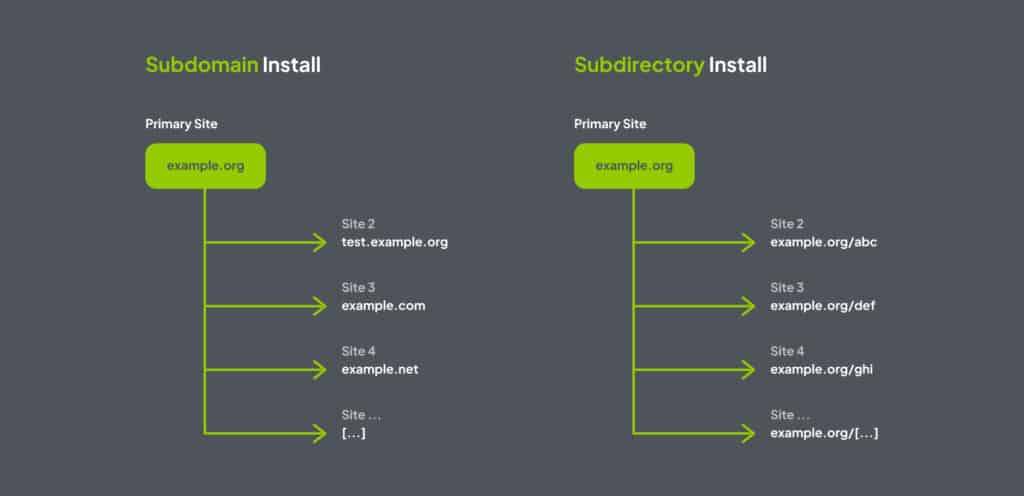
Multisite networks can use subdomains (site1.example.com), subdirectories (example.com/site1), or custom domain mapping (brand-a.com, brand-b.com). Each model has pros and cons depending on SEO, hosting, and client needs.
Under the hood, Multisite changes the database structure. You still have shared tables like wp_users and wp_usermeta, plus a full set of per-site tables such as wp_2_posts, wp_3_posts, and so on.
A key table, wp_blogs, records every site with its blog_id, domain, and path. The site_id defines which network it belongs to, which becomes important when running multiple networks.
This layout allows independent content within one database, but it also adds complexity. The database grows fast, and cross-site queries can be tricky if not handled carefully. Developers should understand this structure for migrations and performance tuning.
Real-World Needs Are Rarely Neat
Clients do not think in subdomains or directories. They think in goals.
A company might want a .com site, regional domains, and multiple languages, all under the same brand umbrella: brand.com/en, brand.fr, brand.fr/de. From their point of view, it should just work. For us, that means finding ways to combine technical structures that were not designed to mix so freely.
This is where Multi Networks can help. With plugins like WP Multi Network, it is possible to create several independent networks inside one WordPress installation. Each network can have its own themes and plugins, perfect for organizations with regional or brand-specific requirements.
It is not part of Core and its interface is minimal, but for complex setups it often provides the most practical solution.
Development and Management Tools
Setting up Multisite has long been intimidating, editing wp-config.php, managing DNS wildcards, and configuring SSL for multiple domains. Fortunately, the developer experience has improved.
wp-env, the Docker-based local environment tool, can spin up a Multisite instance with one command. A simple .wp-env.json file ensures everyone on the team runs the same environment, with multisite: true enabling network mode instantly. Composer, WP-CLI, PHPUnit, and even Xdebug are available right inside the container, making local Multisite predictable and reproducible.
WP-CLI is another essential tool.
Commands like wp site list or wp site create let you manage hundreds of sites without touching the Network Admin. For large installations, scripting bulk operations saves hours and reduces human error.
Current Limitations and a Vision for Improvement
Despite its strengths, the Multisite interface has not evolved much. The Network Admin feels fragmented: navigation is inconsistent, bulk actions are limited, and there is little visual feedback. While you can network-activate a plugin, there is no quick way to see on which sites it is actually used.
User management has similar gaps. There is no clear overview of who has access to what, and adding a new site often involves repeating the same manual steps. For newcomers, these limitations create friction; for experienced admins, they mean wasted time and a higher risk of mistakes.
All the data needed to manage Multisite already exists in the database; it is just not presented effectively. By adopting concepts like DataViews and DataForm, WordPress could offer a modern, unified interface for managing sites, users, plugins, and themes.
Imagine opening the Network Admin and immediately seeing where each plugin is active, or viewing all a user’s roles across the network and acting on that information directly without switching between screens.
This is the direction Multisite should move toward: consistent, flexible, and action-driven interfaces. Streamlined visibility, fewer repetitive steps, and intuitive controls would make Multisite more accessible to newcomers while saving experienced admins significant time and effort. The potential is clear; what is needed is a design that surfaces the power of Multisite without burying it under complexity.
Experimentation and Core vs Plugins
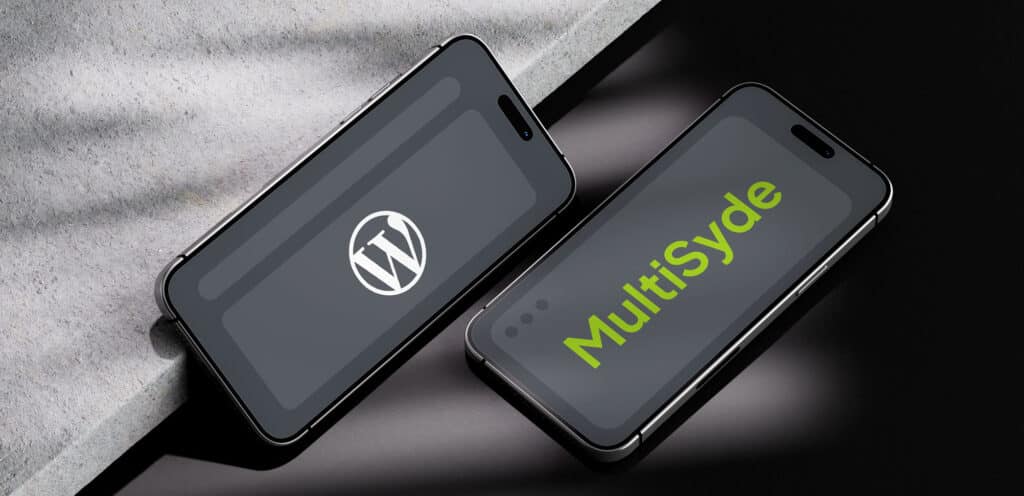
To explore ways to improve Multisite, I have been testing ideas in plugin form. Together with my colleagues from Syde, we developed MultiSyde, a plugin that adds network-wide visibility for plugins and themes inside the existing admin screens. It also includes tools to streamline onboarding, so new sites start from predefined templates with activated tools and default content.
These prototypes are not final solutions. They are proofs of concept that help us learn what works, what does not, and which improvements make sense to propose for Core later.
Core should focus on universal features such as stability, performance, accessibility, and security. It should also improve fundamental workflows for managing sites, users, plugins, and themes clearly and consistently.
Plugins, on the other hand, are the place for specific workflows or opinionated UI changes. This separation keeps Core lean while allowing experimentation. The main question is straightforward: Is it essential for almost every Multisite user? If yes, it is Core material. If not, it should remain optional.
How to Get Involved
Multisite has been part of WordPress for over fifteen years, and it continues to evolve. As the backbone for many complex WordPress sites, Multisite plays a crucial role in the WordPress ecosystem. Whether you’re a developer, tester, or simply a user with ideas, there are many ways to get involved and help shape its future:
- Code: Work on Core tickets for the Networks and Sites component.
- Test: Try nightly builds, test patches, and report issues.
- Feedback: Help us make MultiSyde better by sharing your real-world experiences and feature requests with us on GitHub.
- Join: Participate in the #core-multisite channel on WordPress Slack.
Every contribution, big or small, helps move Multisite forward.
Looking Ahead
Multisite remains one of WordPress’s most powerful but least understood features. By simplifying setup, improving visibility, and modernizing its interface, we can make it accessible to a much wider audience without losing the flexibility that makes it special.
The journey that started with curiosity back in 2010 continues today: exploring, testing, and collaborating to make WordPress Multisite more efficient, more consistent, and more enjoyable to use.
As part of this effort, our team at Syde has developed MultiSyde, a plugin that enhances network-wide visibility for plugins and themes and streamlines onboarding for new sites. Tools like this help turn ideas into practical solutions, while also informing potential improvements that could benefit the wider WordPress community.
Need Help With Your Complex Site?

Related articles
-
The Thump: What AI Will Never Understand About WordPress
In 2000, Royal Enfield was nearly dead. What saved it has everything to do with WordPress — and nothing to do with specs.
-
Why Choosing the Right CMS Can Make or Break Your Website
When it comes to building a website that actually works for your business, the CMS isn’t just another tool, it’s the backbone of the entire operation.