
Executive Summary
Many marketing teams that work across multiple markets run into the same wall. Their platform can’t keep up with how they actually need to work. Multisite fixes this at the foundation, so teams can run their content across regions without the usual mess.
One WordPress install can power many market sites. Each site gets its own content, design, domain, language, and local team. Central governance still applies across the whole network. Brand standards are built into the platform itself, so they don’t depend on PDFs, SOPs, or templates that get ignored. When a new market goes live, it inherits the approved setup. What used to take months can launch much faster.
A common worry is that Multisite forces every site to look and act the same. It doesn’t. Later in the article, a feature breakdown shows how each piece of a typical setup can be fully shared, fully local, or somewhere in between.
Third-party integrations get built once and shared across every site. That saves time and money. Security patches and updates roll out from one place, so no one has to repeat the work market by market. Analytics pulls from one clean dataset instead of a patchwork of setups. And because governance lives inside the platform, local teams get the freedom they need without putting the brand at risk.
Multisite supports three main governance models: central brand with local execution, federated with shared guidelines, and hub and spoke. Each one fits a different way of splitting work between central and local teams.
The rollout happens in five phases. Discovery and audit, architecture and governance design, building the validated pattern, rolling out to markets, and ongoing operations and governance. Most of the heavy lifting sits in discovery and the first site build. After that, every new market is a configured version of the same pattern.
One thing worth remembering. Multisite is a platform, not a fix-all. It can’t write your governance model or settle disputes between central and local teams about who owns what. It creates the right conditions for clean execution. The decisions sitting on top of it still need real people to make them. That’s true for Multisite, and it’s true for any CMS.
Why Multi-Market Campaigns Slow Down at the Platform Layer
A marketing campaign is approved in your headquarters office. The visuals are ready. The copy is approved. The translations are coming in. And, on paper, it needs to launch in twelve countries by the end of the month.
But then the rollout hits the platform layer. Three markets are on one CMS, four on another, the eighth is on a patchwork that grew through acquisitions. Each of the local websites has its own approval chain and its own plugin stack. They’re all a little different, in all the wrong ways. And so what should’ve been a clean campaign launch is now twelve separate, clunky launches, each held up by the duct tape of the platform underneath.
This is the multi-market website problem.
It is not new, and it gets worse as digital portfolios grow across markets or regions. A Multisite setup with WordPress offers a simple architectural solution to a fragmented digital estate. And it’s something worth looking into if rolling out a multi-market campaign feels something like ripping off a full-body band-aid.
Common challenges multi-market marketing teams have with fragmented CMS setups
A typical complaint we’ve heard from people trying to execute marketing cross-market campaigns usually sounds something like “our CMS is slow.” Platform speed, however, is rarely the actual issue, because the real problems causing it to feel “slow” for marketers are structural:
- Every market site behaves differently because it was built by a different agency at a different time on a different stack. Components aren’t matching, layouts diverge, and the same brand asset renders three different ways across the portfolio.
- Adding a new market may require a new environment, new integration stack, new SSO conversation, new analytics setup. Procurement may budget months for work that architecture should be able to absorb in weeks.
- Third-party integrations have to be built and maintained separately for each site. On older or more isolated setups, some integrations aren’t technically feasible at all. On others, the cost of replicating them across the full estate makes the business case disappear.
- Brand standards are documented in PDFs, applied inconsistently across markets, and corrected after the fact when something slips, or through a slow, misaligned review process. Brand teams spend more time on auditing than planning and creating.
- Central teams are seen as bottlenecks by regional teams. And regional teams are seen as governance risks by central teams. Both are reacting to a platform that does not enforce a structure that would solve for both.
- Reporting requires pulling from multiple analytics implementations and reconciling them manually. Cross-market campaign reporting takes a week or longer to assemble and is outdated by the time it lands.
- Security patches and platform updates have to be coordinated site by site, which means a fix may sit unapplied for weeks in one place after it has gone live in another. And it can harm an entire company’s digital security score if a site is missed or an update is delayed.
The point of most friction is that marketing teams end up doing operational and platform work that has nothing to do with marketing.
How WordPress Multisite works: architecture and user roles
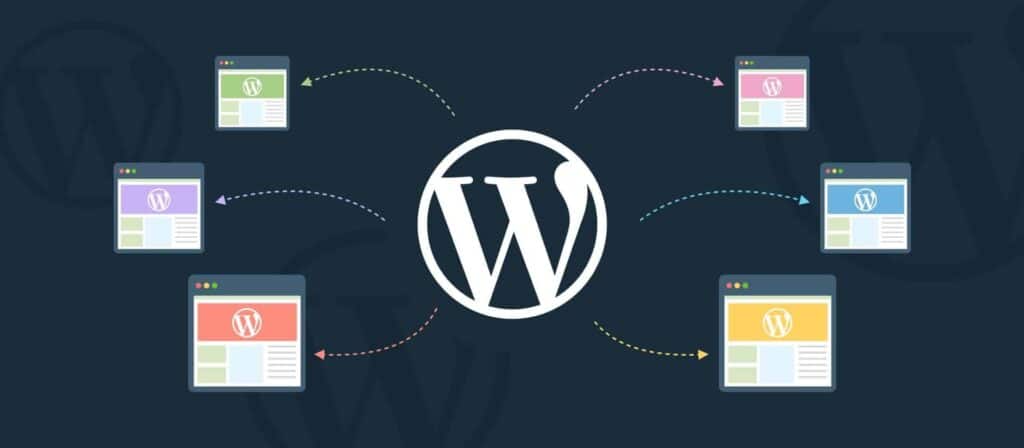
Multisite is a feature of WordPress at enterprise level that lets you run and operate multiple sites from a single core installation. The setup looks like this:
- One core WordPress installation, maintained centrally.
- Approved themes and plugins, activated at the network level. (Even if the visual look and feel of the themes are different from each other.)
- Multiple sites, each with its own content, URL structure, language, and editorial team.
- A network admin layer that governs what each site can and cannot do.
WordPress Multisite also has four default roles relevant to marketing.
However, because WordPress offers a high level of customizability, organizations can create additional roles based on their governance needs:
- Super Admins control the entire network. Add and remove sites, manage plugins and themes for everyone, set the security baseline. Typically sits with the central IT or platform team.
- Administrators run a single site within the network. Can manage local users, configure local site settings, and publish content. Can configure plugins, but cannot install plugins or change network-level rules. Typically the senior marketing lead per market.
- Editors can publish and manage content across the site, including content from other authors. Individual content publishing processes for content governance can be made for them. This role would be for local editorial leads.
- Authors can write and publish their own posts. These roles apply to local content contributors and translators.
Each market site shares the same foundation: the hosting environment. But the options that organizations can choose to customize and change per site include the plugin stack, user role definitions, security configuration, content, language, regional compliance, local team permissions, design and more. Specific details about what changes and to what degree on a given site are completely up to you. You own the full range of flexibility and customization.
To anyone visiting, the differences between your website for neurology (for example) and your consumer healthcare website could not be more obvious. But underneath, they share the same infrastructure, while maintaining their independence and individual distinctiveness.
Every brand gets its own presence, but you manage one platform. For organisations managing multiple brands across multiple markets, that’s the practical argument for WordPress Multisite.
Sites can run on subdomains (de.example.com), subdirectories (example.com/de/), or entirely separate domains (example.de). The structure maintains your SEO strategy and how distinct each brand needs to feel externally.
Instead of running twelve websites on 3-4 different platforms, you can run all twelve sites on one.
What stays shared, what stays flexible, and what stays local on a Multisite setup
A common misconception is that because Multisite runs on a central shared foundation, it doesn’t offer users and organizations the customizability they need for their local sites. But that’s simply not the case. Multisite system has a shared foundation, however the layers above it are yours, and you have full autonomy to dictate your own flexibility, control, access, and functionality.
Here’s where every part of a typical enterprise setup can sit:
| The Shared Foundation (Central teams) | Can Be Standardised or Flexible(Central or local) | Can Be Fully Market or Brand Specific(Central or local) |
| WordPress core (single update path) | Plugins | Activated plugins |
| Hosting infrastructure | Theme framework | Theme design |
| Security standards | User roles and permissions | Colours and branding |
| SSO / identity provider | Editorial workflows | Navigation structure |
| CI/CD pipelines | URL structure | Domains |
| Governance model | Content modules and blocks | Content and campaigns |
| Compliance standards | SEO framework | SEO strategy |
| Backup and monitoring | Analytics setup | Tracking IDs |
| Shared plugin integrations | Cookie and consent setup | Legal pages |
| Central update management | Translation workflows | Languages |
| Accessibility standards | Multilingual setup | Local integrations |
| Observability and logging | Design system | Local tools and vendors |
| Infrastructure architecture | Approval workflows | Search configuration |
| Central component library | CRM integration patterns | Forms and automations |
| Shared APIs | Ecommerce architecture | Market-specific UX |
| Enterprise security policies | Content model | Local workflows |
| Disaster recovery strategy | AI tooling | CRM instances |
| Caching strategy | DAM / media library strategy | Product catalogues |
| Search functionality | Taxonomies | |
| Forms framework | AI prompts and workflows |
How WordPress Multisite improves operations and execution for marketing teams

The benefit is not “WordPress is cheaper.” Sometimes it is, sometimes it isn’t, depending on what you are replacing and the timeframe you’re looking at. However, the real benefit to enterprise organizations is the operational capabilities Multisite offers for cross-market teams.
Adding a new market becomes about configuring and expanding existing systems, not building new ones. When a brand needs to expand into a new country, the technical groundwork is already there. The approved plugin stack, the brand-enforced theme, the analytics tags, the SSO integration, the user roles, and the approved translation management architecture all already exist. The new site spins up and inherits the technical requirements, and marketing focuses on the actual content for the new market without being held back by the technical shortcomings of a fragmented CMS. What previously may have taken months can sit in the range of weeks with a properly governed Multisite network.
Brand consistency is handled on the platform level. Theme styling, typography, colour tokens, header and footer components, and approved layout patterns live in code at the network level, and central teams decide how much freedom they give each brand or local market. Local teams can publish freely within the system, but they can’t change fonts, replace headers, or override the colour palette through the editor. What stays open per market is exactly what should be open. And again, it’s up to central teams to decide how much freedom is given to local markets.
Local autonomy is managed without putting central governance at risk. On top of the existing benefits, when you implement a proper governance model into your Multisite build, you can give more autonomy to your local teams without increasing risk for core governance. Every market team gets the access they need to run their site. But they cannot install plugins, change security settings, or modify the underlying configuration. And this is done once for the entire Multisite setup, instead of several times for each individual website. Although it’s important to note that Multisite gives you the capability, but it doesn’t automatically implement a governance model for you. This is why it’s recommended to work with an expert implementation partner at the initial governance model stage and through ongoing scheduled management.
Multilingual content management can live inside the platform. Tools like MultilingualPress connect sites within the network so that translation relationships, language switching, and hreflang are part of the architecture. When you publish a piece of content in your master market, you can duplicate it as a draft to other markets with one click, optionally AI-translating it already. Hreflang tags (the HTML attributes that tell search engines which language and regional version of a webpage to serve) are generated automatically based on those relationships. The language switcher in the header maps to the same logic: Translation workflows can sit completely autonomously alongside content workflows rather than running in parallel systems that have to be reconciled or needing to be connected to different websites.
Digital Asset Management runs from a central source. With a DAM setup inside Multisite, images, video, and other media live in one central place (typically the first or “meta” site in the network) rather than being uploaded into every market site individually. Local teams can then pull approved assets from the central library, and alt text and captions can be translated for each market. If your assets need to live outside WordPress entirely, for example, when the same library serves print, social, email, and other channels alongside the website, a third-party DAM provider can connect to the Multisite network instead, with translation still applied the same way. Marketing teams don’t have to maintain duplicate copies of the same asset across every market, and approved creative gets pulled from one source rather than re-uploaded, re-versioned, or re-edited site by site.
One source for analytics and reporting. Tools like Google Analytics and Parse.ly deploy through a network-activated plugin across every site. You can run separate properties per market for local reporting and a roll-up property for cross-market views, or a single property with custom dimensions for market and language. The options are endless. Cross-market campaign reporting becomes a query against one consistent dataset rather than a manual reconciliation across mismatched implementations.
Security and compliance updates apply across every market in a single deployment. When a plugin needs patching, a theme update fixes a vulnerability, or PHP needs a security update, the change rolls out network-wide. No need to coordinate twelve separate maintenance windows or chase market teams for sign-off. If your industry requires audit trails for changes, the network captures them clearly in one place.
Three governance models for WordPress Multisite that enable marketing teams to succeed
Multisite gives you simple, efficient architecture. What you build on top of it depends on how your organisation actually divides marketing responsibility between central and local teams. Three governance models that a Multisite setup enables include:
Central brand, local execution. The brand team owns network configuration, the theme, the approved library of reusable design components, and the campaign templates. Local market teams publish within those guardrails. This works well in regulated industries that require higher levels of central governance (pharma, financial services, healthcare) and for brand-led organisations where consistency across markets is the priority.
Federated with shared guidelines. Each market team has more autonomy over their site, but works against a shared style guide and an approved core stack. The central team handles platform updates, shared plugins, and audits. Common in higher education, mid-cap brands, and organisations where local relevance is more important than central uniformity.
Hub and spoke. Central marketing publishes master content (product launches, campaigns, brand stories) and local teams adapt and republish with localised assets, languages, and messaging. The master content acts as the source. This model makes it possible for consumer brands, multi-brand portfolios, and organisations with strong global campaign engines to roll out network-wide or global campaigns.
The right direction to choose these types of operational models really depends on how marketing teams actually work in your organisation. Multisite supports all three, with plenty of room to customize and adjust between.
On the other hand, a fragmented portfolio may try to run one model, but end up with a completely different one in practice, which is usually why they feel broken, slow, and disconnected.
The five phases involved in a WordPress Multisite implementation
A Multisite implementation is a portfolio-level architecture project, so it shouldn’t be treated as a CMS swap. For marketing teams, knowing what each of the implementation phases looks like makes it easier to plan work and manage internal stakeholder expectations.
- Discovery and audit. The first phase is a discovery and an audit of the current portfolio. An agency needs to know how many sites your organization is operating with, on what platforms, with what third-party tools or specific functionality, what content types, what governance, what URLs, what analytics history. Marketing needs to be involved during this stage on the brand and content side, while the agency or platform team would lead it on the technical side. The output gives internal teams a clear picture of what exists, what needs to migrate, and what can be retired.
- Architecture and governance design. Before any building starts, the governance model has to be defined: theme structure, approved block library, plugin stack, role mapping per market, translation workflow, content templates, brand-level locks, and integration mapping. The new platform sits at the centre of your MarTech stack, so marketing’s input here is critical. If the new architecture is built without input from marketing teams, the new structure becomes optimized for IT efficiencies, not for marketing effectiveness. And since we’re talking about increasing marketing effectiveness here, it’s the latter that matters.
- Build of the validated pattern. One site, usually a priority market, is built first as the canonical example. It is validated technically, brand-checked, and signed off as the approved pattern. Everything that follows is a configured version of this site, bringing us to the next step.
- Rollout across markets. Each subsequent market becomes a configuration against the validated and proven pattern rather than a fresh project (which saves a lot of time and budget during each implementation). Content migration runs in parallel to the rollout and is carefully planned alongside local team training and workflow revisions. Volume, URL structures, redirects, metadata, and media assets are all mapped before anything goes live. Some markets will launch quickly. Others will need more time depending on content volume and local stakeholder readiness, which is also something that requires involvement from marketing teams.
- Operations and continuous governance. After launch, the network handles updates, security, and platform changes centrally. New features, third-party integrations, and platform improvements roll out across the network from one place, rather than market by market. Marketing focuses on content and campaigns. The governance model defined in phase two becomes the day-to-day operating model.
The bulk of the effort sits in the first phase and the first site. Everything after that compounds.
There are some things that Multisite does not solve
Multisite is an architecture. It isn’t a strategy.
It does not solve the question of who owns what content. It does not write your governance model. It does not stop political disagreements between central and local teams. And it does not work if each market team in the organisation keeps operating like it has its own platform. Multisite also does not replace good editorial discipline. If local market sites publish low-quality content on a fragmented portfolio, they will publish the same low-quality content on Multisite.
The platform makes consistency, governance, and rollout possible and easier, but it does not make them happen on its own. The organisational work that sits on top of the platform, who approves what, how local content gets reviewed, how translation flows are managed, how brand exceptions are handled, still has to be designed and agreed upon. The platform makes those decisions possible and easier to implement, but it does not make them for you.
Common answers to questions local market teams will typically ask about WordPress Multisite

Local market teams rarely welcome a central platform change. This is because their default position is to protect their autonomy and their existing workflows, which is reasonable, especially if they’ve been working a certain way for a longer amount of time.
Marketing leads or central teams proposing a move to Multisite should expect similar questions in every market kickoff. Here are the right answers to some of the more common questions:
“Will we lose autonomy?”
No, however, your autonomy will change shape. Local teams keep control over content, campaigns, navigation, and the local editorial calendar. What changes is platform-level autonomy: Central teams decide which plugins get added, which fonts are used, which colours appear at the brand layer.
Central teams are able to share plugins or products across markets through a simple activation and configuration process, which not only reduces costs but also benefits the multisite setup as a whole since new features and improvements can be added on an ongoing basis. That sits at the network level, but central management can also give local teams control over aspects at the platform level if required. The trade is platform-level freedom for editorial-level freedom, with complete organization-wide flexibility.
“Will our local SEO suffer?”
Not if the agency handling the migration implements it properly. URL structure, hreflang implementation, page speed, and the technical foundation usually improve on a centrally governed network compared to fragmented setups. Where local SEO does suffer is when migration mapping is rushed, and 301 redirects from old URLs are not implemented properly. Problems like this come down to planning and aren’t caused by the platform. The advantage of Multisite is that since everyone uses the same system, your different markets can learn and take advantage of the shared expertise and experience.
“Will we still be able to run market-specific campaigns?”
Yes. Your site is your site. Landing pages, localised content, regional campaigns, and market-specific creative are all yours. What the platform standardises is the foundation: the theme (or themes), the brand layer, and the approved components. Everything above that foundation is local-market territory, and you can add or remove as much control or flexibility as you want for each individual market or team.
A multisite setup not only enables local markets to create and adapt campaigns to their specific region or market, but it also provides more efficiency to the central teams since they can roll out global campaigns across all websites from a single location. An additional advantage for local teams is that centrally driven campaigns no longer need to be implemented manually by each local team. The central team can create, manage, and publish campaigns across the entire network, significantly reducing effort on local teams and accelerating time-to-market.
“What about our existing tools and integrations?”
Bespoke integrations built for your current CMS will be reviewed during the architecture build stage. When executed correctly, the discovery phase identifies these early, so the rollout doesn’t surprise anyone. Most marketing automation, CRM, and analytics tools integrate cleanly with WordPress thanks to the global market share dominance of the platform (nearly 40% of all websites globally are powered with WordPress). On multisite, these implementations are done once, instead of on an ongoing, subscription-style basis, which saves huge amounts of budget over the long-term.
“How fast can we move? Do we need IT approval for everything?”
For your content and site configuration, no. Day-to-day publishing, page updates, navigation changes, and campaign launches sit with the local team. Optimized workflows can be adapted by other markets, and media can be shared between different sites to further help with executional efficiency. IT or central platform approval is required only for changes to the underlying platform: new plugins, security configuration, network-level rules.
When does WordPress Multisite make sense for your organisation?
Multisite is worth evaluating when:
- You run two or more market sites or a portfolio of multiple brands, and the number is growing.
- Localization is your priority, and you want to adapt content strategically for each market or region you operate in.
- Adding a new market currently takes months when it should only take days or a few weeks.
- Lack of brand consistency or inconsistent brand awareness across markets is a recurring internal complaint.
- You’d like to share digital budgets between different markets.
- Your current setup is fragmented across multiple CMS platforms, multiple installations of the same one, or sits on a CMS that does not natively support multi-market governance.
- Your marketing team is spending more time on platform operations than on marketing work.
- Your portfolio is regulated, and audit trail consistency across markets is a current or upcoming requirement.
- Strict compliance and security of each site is required across the different markets you operate in.
Multisite is made for exactly what its name suggests: multiple sites.
It’s less relevant when you run only one site or one language, or when your portfolio is genuinely diverse enough that each market needs a completely different platform. (Although, even in this situation, multisite can reduce hosting costs since you can manage your hosting on one server and installation instead of being done separately.) It is also less relevant if the central team and local teams cannot agree on a governance model in principle, because Multisite will not generate one for them.
If you are weighing CMS options for the next three to five years, the question shouldn’t be about which CMS has the best feature list today. Because organizations should focus on which CMS gives their marketing team the structural conditions to work well as the portfolio grows.
Multisite is one strong answer to that question for organisations running global digital estates.
Looking for ways to improve your marketing across markets?
Explore our bespoke, multi-market WordPress solutions that we’ve created for enterprises and multi-market organizations across the globe.
WordPress for Enterprise — We use Multisite to build architecture, governance, and platform strategy for organisations running complex, multi-market digital portfolios.
Multilingual WordPress Solutions — Multi-market content management, hreflang, regional SEO, GEO, and translation workflows built on MultilingualPress, the second most-used plugin on WordPress VIP. Built and maintained by Syde.
Quality Assurance — Get expert QA for your existing installations, or enjoy access to our quality assurance teams during the creation of your new installation.
Stakeholder Alignment — We help internal champions sell the multisite vision to leadership, markets, and sub-companies, taking the fear out of centralization and getting competing interests behind one platform.
Content Migration — URL mapping, redirect strategies, metadata, and asset migration across large and complex estates.
Custom Integrations — Build the bridge for your new platform needs to talk to the rest of your organisation, with custom integrations for existing CRMs, ERPs, analytics platforms, SSO, and MarTech stack connections.
Maintenance & Support — Centralized updates, security monitoring, and platform governance after launch.
Training & Workshops — Hands-on training for local teams on new platforms, new roles, and new workflows.
Ready to consolidate your multi-market web estate? Contact Syde.
Related Articles
-

Syde CEO Alex Frison
At Syde, we always strive to improve ourselves. That’s our inspiration.
-
The story of BackWPup: From the plugin idea to 10 million downloads
BackWPup inventor Daniel Hüsken tells in this interview how the popular WordPress plugin BackWPup was created 10 years ago and how it finally came to Inpsyde.
-

Why Choosing the Right CMS Can Make or Break Your Website
When it comes to building a website that actually works for your business, the CMS isn’t just another tool, it’s the backbone of the entire operation.
Failed to submit:
one or more fields are invalid.