
Executive Summary
Most CMS evaluations focus on the costs that are easier to compare and see up front, such as licence fees, hosting, and implementation, while the costs that ultimately determine whether the choice was sound only surface later, once the platform is running across an organisation’s markets, editorial teams, and connected systems. Almost all of these hidden costs trace back to a single cause, vendor lock-in, which makes up one of six other criteria to be considered in any serious CMS evaluation.
There are four invisible costs of lock-in that procurement teams tend to overlook.
- The first is that major upgrades on proprietary suites often behave like full migration projects rather than routine updates, leaving the organisation to inherit the vendor’s release cadence and rebuild its customisations each time.
- The second is that talent becomes controlled by the vendor through certification programmes and smaller developer markets, which affects both project cost and how long roles take to fill.
- The third is that the organisation owns neither the product roadmap nor the integration layer, so features ship and are deprecated on the vendor’s timetable while custom bridges have to be maintained through every upgrade.
- The fourth is that content and its workflows sit in the vendor’s cloud in vendor-defined formats, which makes exporting it in a usable form difficult and turns data residency into a compliance concern.
In each case WordPress offers a different position, since the organisation keeps control of its own update cadence, talent supply, integrations, and content ownership.
These four costs can be surfaced before signing with a weighted scoring grid applied to every shortlisted system across seven criteria and a five-year horizon, followed by validation on vendor availability, foreseeable fees, and security support. The visible upfront price is rarely the true cost, and WordPress holds up against proprietary suites on the one measure they cannot match: the cost of leaving.
The Cost of Change
Vendor lock-in doesn’t get considered as a cost until it’s too late. Let’s explore the four main ways vendor lock-in could be costing your organization money.
When an organization performs a CMS evaluation, they typically begin (and end) with the figures that are easy to compare side-by-side: license fees, hosting, implementation. However, the invisible costs that show up later down the road are the ones that will dictate whether you made the right call or not. The only problem is that these costs are harder to put in the business case up front, because they depend on how the platform behaves once it’s running across your different markets, editorial teams, and digital systems it’s connected to.
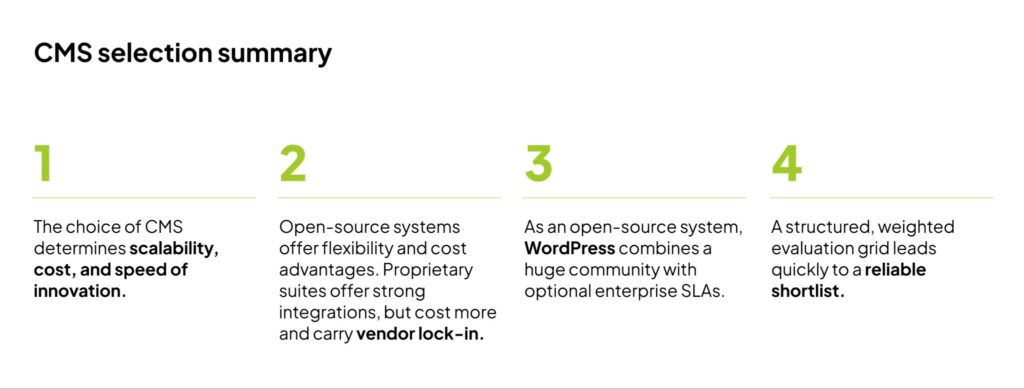
Lock-in is one of seven criteria worth scoring in a serious evaluation of a new, or existing, CMS, alongside scalability, expandability, security, performance, workflows, and total cost of ownership. Let’s look at the four hidden costs caused by vendor lock-in that procurement teams tend to overlook during the decision-making process.
1. Migration projects get disguised as upgrades
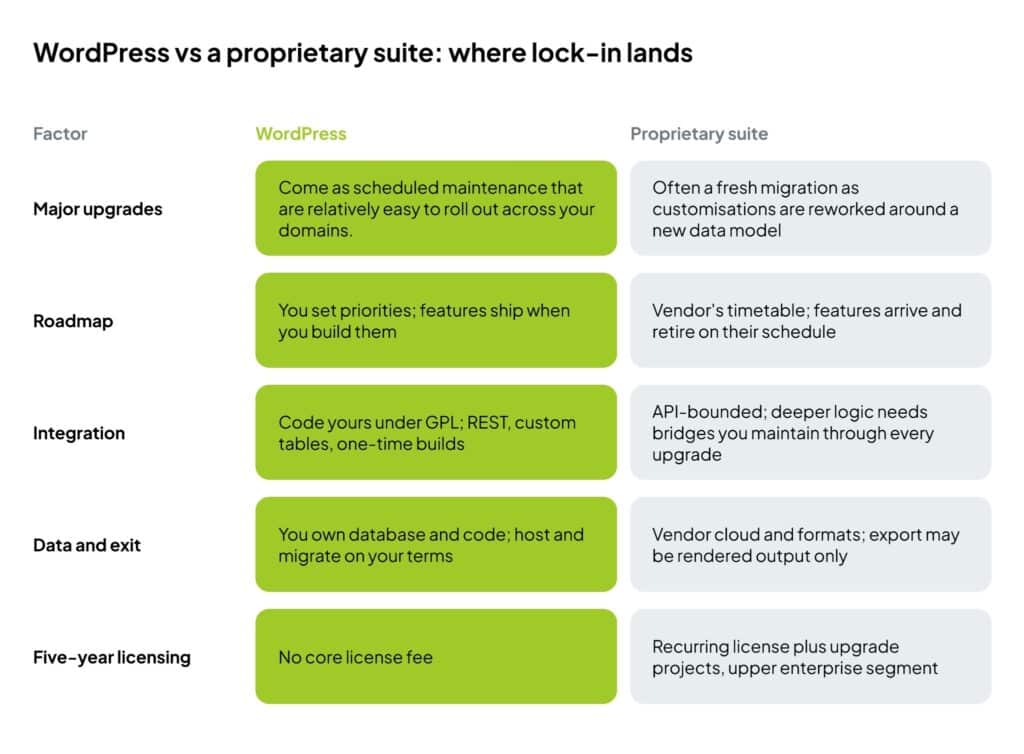
On a lot of proprietary suites, a major release is closer to a second implementation than an update and site-wide implementation. Sitecore, for example, usually requires a migration project when a new update becomes available because the customizations you might’ve built to fit your operations sit on top of the vendor’s data model. When that model changes between major versions, your work that depended on the previous version has to be reworked and retested across the suite’s modules. And even if this doesn’t happen with each update, once is enough to create a serious roadblock in your digital operations.
The big problem here is that you do not set the timing. You inherit the vendor’s release cadence, and each major version carries its own scoping, testing window, and budget request. None of the additional work your teams need to do around an update is seen on the initial quote, making it a lot more difficult to accurately calculate costs. Sitecore’s licensing and maintenance, for example, already sit in the upper enterprise segment, and then any recurring upgrade projects are charged on top of that. The cost of rebuilding your customizations on each major release isn’t included in the licensing fees, and that cost falls to you.
On WordPress, a version update is easier compared to alternative proprietary systems: core, plugins, and themes can be updated on a cadence your team sets, and the code runs on infrastructure you can stage, test, and roll back. This puts the control in your hands, since you dictate the speed, timeframe and cadence for updates. And because of it’s backward compatibility, updates on WordPress run smoother than on proprietary web solutions and major updates are made easier, unlike on proprietary systems where larger updates are more like rebuilds of the platform.
2. Talent is entirely in the hands of your vendor
Adobe Experience Manager runs on its own infrastructure inside Adobe Experience Cloud, and the DevOps work needs engineers who know that specific stack. It does not transfer to a general team. Sitecore is .NET-based with a developer market smaller than WordPress’s, and the people who run it hold Sitecore certifications. Manufacturer certification is good for uniformity and ensuring everyone working on the product meets the same qualifications, but it’s not great for organizations when it comes to supply control. This is great from the vendors standpoint, since they maintain control over the talent pool and newcomers have to go through their certification.
However for organizations that depend on being agile and responsive, this can put a dent in their digital capabilities since the talent pool is kept small and controlled, day rates can be manipulated and the time spent looking for someone to fill a role can get stretched unnecessarily. Talent availability, or lack thereof, feeds straight into both project cost and project duration. When a contractor rolls off or a lead engineer leaves, your only option for a replacement is to try to find someone from whatever that certification programme has produced in your region.
WordPress gives control over your own supply. The WordPress stack is PHP, JavaScript, MySQL, and standard DevOps tooling, and core is GPL, so no vendor decides who is allowed to read, extend, or fix your platform. This gives organizations running on WordPress a greater level of flexibility and adaptability when it comes to talent acquisition for building their platforms.
3. You don’t own the roadmap and integration layers
Proprietary suites are not short on capability. Sitecore ships Experience Edge for headless delivery, an integrated customer data platform, and marketing automation. AEM delivers content fragments over GraphQL and ties into Adobe Target and Campaign. The long-term constraint to organizations isn’t if a system has shiny features or functionality, it’s control.
Release cycles run on the manufacturer’s timetable, so a capability you need ships when it reaches their roadmap, and a feature you rely on can be deprecated on their schedule, which forces you to adapt to your vendor, and not the other way around. Proprietary systems are incentivized to make an appealing product that keeps their clients locked in it, regardless of the overhead strain it causes once something within the software changes.
Integrations carry the same limit. The published APIs connect the platform to your CRM, analytics, and commerce systems, but you can extend it only as far as the vendor’s model allows. Anything past that point needs custom bridges, and your teams need to maintain those custom bridges through every subsequent upgrade.
With WordPress the code is yours to read, modify and keep. A custom integration on WordPress is a one-time build on a foundation that you own, not a standing liability pinned to another company’s release notes. As an open source platform, WordPress itself doesn’t have inherent incentives, but its pool of core contributors and developers does. And they’re incentivized to make the platform as good as it can be for as long as possible. And large agencies and hosting providers within the ecosystem actively contribute hours for their teams to continually improve it.
4. You can’t take content with you in a usable form
With most proprietary suites your content and the workflows around it sit in the vendor’s cloud, in formats defined by the vendor. You don’t have a say, and there isn’t much flexibility. That lock-in compounds even further as those formats and workflow engines spread across business units, because each team that adopts the native templates, components, and approval flows adds another layer to what you would have to rebuild elsewhere.
Webflow is the clearest example of this. You can export a site, but only as static HTML, with full code access limited, so the export hands you the rendered output and not the system that produced it: not the content model, not the editing structure, not the data relationships. It also won’t include your audit trails and revision history. This turns data residency from an inconvenience into a compliance challenge since you need to know where the records physically sit, in what format they come back, and what does not survive the export.
WordPress tackles this challenge differently. Your content is held in a database and application code you own, so you can host it in the jurisdiction your regime requires and move it between providers without a vendor’s sign-off. For an estate under GDPR or sector audit, this means that you’re able to produce records directly, without waiting or depending on a vendor’s export process. Ownership of your content is fully yours.
How you can predict the costs of a CMS from your shortlist across five years
A simple but effective way to surface the invisible costs of a CMS before signing is with a weighted scoring grid, and it runs to about twenty minutes per system. Score seven criteria from one to five and weight each to your specific business: vendor lock-in, scalability, expandability, security, performance, workflows, and total cost of ownership. Put WordPress, Sitecore, AEM, Webflow, or any other contender on your list through the same grid so the comparison is like for like. Then validate the survivors on three points the score hides: whether qualified vendors are actually available to you in your region, the foreseeable license and hosting fees across a five-year horizon, and who provides security updates and for how long.
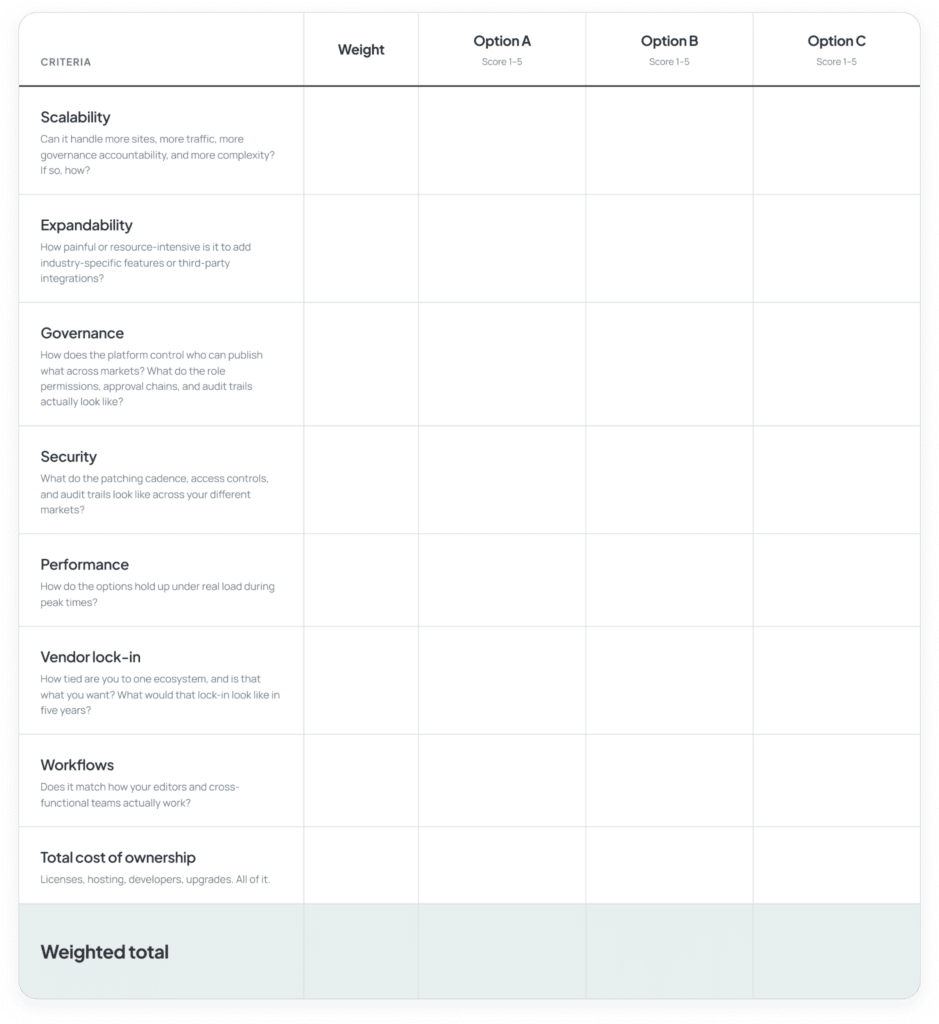
Something we have to say is that a poor score for one platform doesn’t necessarily make it the wrong call for the individual needs of your organization. The key, however, is to score each option across a long-term timeframe and consider potential hidden costs along with the platform’s upfront licensing fees. The visible price is seldom the actual price you pay once you’ve been locked into a system for years and want to get out.
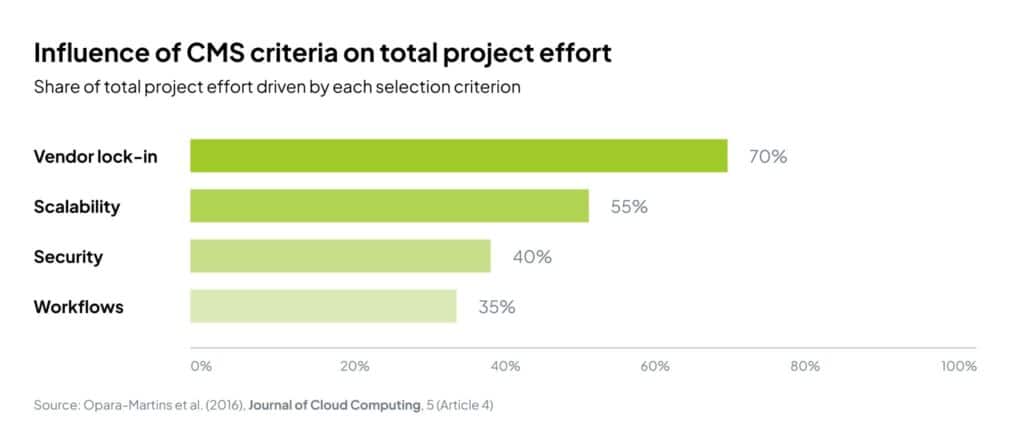
Proprietary data formats are the main driver of lock-in
A 2016 analysis of cloud and platform migration in the Journal of Cloud Computing identifies the cost of re-engineering around a vendor’s data formats as the primary barrier to leaving. A CMS migration meets the same wall, for the same reason.
Where this leaves WordPress
WordPress earns its shortlist place on specifics. It runs more than 40% of the web. Of course, a lot of those sites are blogs, or single-page websites. On the flipside, however, a lot of those are high-performance multinational websites like NASA, TIME Magazine, and The Walt Disney Company Newsroom. WordPress Multisite can run hundreds of instances on a single core, making it an extremely powerful architecture when one team operates across dozens of market or brand sites. WordPress VIP, WP Engine, Kinsta, Pantheon and comparable enterprise hosts add SLA-backed security and performance and DDoS protection, providing the exact accountability IT and legal look for before they sign off on open source.
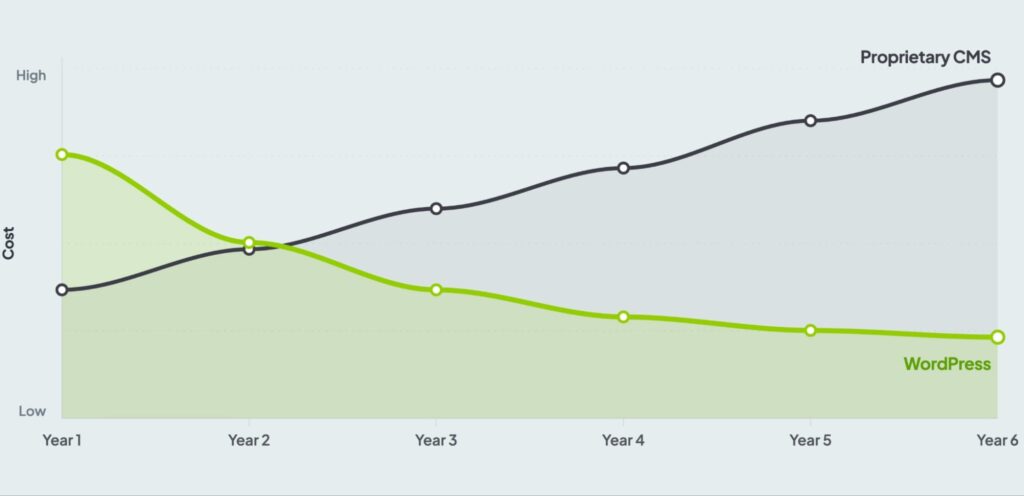
When a WordPress platform is built with precise plugin and governance discipline, it gives an enterprise organization the security and SLA profile it needs while keeping the data model, the release schedule, and the adaptable talent market in your hands. And that’s exactly how WordPress holds up against a proprietary suite, on the one criterion the suite cannot match: the cost of leaving it. A WordPress installation may have a higher up-front cost during the consideration stage of a decision, but over a period of 5+ years, the cost-savings of utilizing WordPress compared to a locked-in system are massive.
Change to a platform that doesn’t hold you back.
We work with enterprises to plan and execute CMS migrations to WordPress, with zero shortcuts on content, architecture, or post-launch stability.
Websites & Relaunch — Full relaunch projects, from scoping and design through to build and go-live, on a platform you actually own.
Content Migration — URL mapping, redirect strategies, metadata, and asset migration across large and complex estates.
Custom Integrations — Connect your new WordPress platform to your existing CRM, ERP, analytics stack, SSO, and MarTech tools.
Maintenance & Support — Centralised updates, security monitoring, and platform governance once you’re live.
Quality Assurance — Expert QA for your new installation, or a full audit of your existing one before you decide what comes next.
Got some questions? Talk to our experts.
Related Articles
-

Get Your WooCommerce Store Ready for Cyber Week (Without the Chaos)
The clock is ticking toward the busiest shopping season of the year.
-
WooCommerce Update 3.7 – New Product Blogs and higher PHP Requirements
WooCommerce released version 3.7 with new product blocks.
-

Introduction to Machine Learning in PHP
The applications of machine learning are extremely diverse and the concept is becoming increasingly popular. Inpsyde developer Emili Castells explains how machine learning works with a simple example:
Failed to submit:
one or more fields are invalid.