
Traditional CMS implementations are often organized around pages. Content is written for a particular page, then placed into a template and published to the website. However, when another channel needs the same information, teams often have to reproduce, adapt or manually transfer it. As the number of brands, markets and channels grows, this clunky publishing process becomes more and more inconvenient.
When it comes to publishing for pharmaceutical organizations, a company may need to publish and manage content across their corporate channels, including websites, brand sites, HCP portals, patient resources, email, mobile experiences, CRM-driven communications, sales tools and other digital channels.
Without a platform that enables omnichannel content delivery, content management becomes a massive publishing bottleneck. Content gets duplicated, updates take longer and different versions begin to appear in different places.
Combined with structured content, APIs and the right governance model, WordPress Multisite can provide a structured foundation for managing content, technology and reusable components more consistently across brands, markets and digital channels.
What is WordPress Multisite?
WordPress Multisite is a powerful enterprise capability within WordPress core that allows multiple websites to run from a single installation. Each site, brand or region can still have its own language, content, design, settings and domain. Users can be shared across the network. And each account can have the ability to have different permissions and access for different sites.
For a pharma organization operating across many different digital properties, Multisite provides a useful distinction between what should be managed centrally and what should remain specific to a website, brand or market.
Central teams can control areas such as:
- the core WordPress platform
- approved plugins
- shared functionality
- design systems
- security standards
- integrations
- analytics implementation
- reusable components
Individual sites can maintain their own content and local configurations within the existing shared framework. Multisite also adds a Super Admin role with network-level control. Local site administrators can manage their own sites, but cannot install plugins or make network-wide changes, which removes a lot of the risk central teams would otherwise worry about dealing with.
Why does omnichannel content delivery create problems for traditional CMS platforms?
A CMS designed mainly around web pages tends to be optimized for that specific content, while making publishing outside your typical content types a lot more tedious for marketing teams. Omnichannel delivery becomes more effective when content can be managed independently from the page or interface where it appears. And WordPress Multisite supports omnichannel publishing when content is structured as reusable information rather than only as finished web pages.
How WordPress can turn pharma content into reusable structured content
WordPress can store content as more than complete web pages. Custom post types, taxonomies, metadata and custom fields allow teams to separate individual pieces of information and manage them according to what they are. For example, WordPress can be configured to manage content types such as:
- product information
- clinical claims
- study summaries
- safety information
- indications and prescribing information links
- product and patient resources
- approved images and media
Each item can also carry information about its brand, market, language, audience, approval status, publication status or expiry date. How that information is stored affects how easily it can be managed and reused.
Information that needs to be searched, filtered or grouped regularly, such as brand, market or audience, can be stored in taxonomies. Details linked to an individual item, such as an approval reference or review date, can be stored in custom fields.
Expiry dates require separate handling. For example, WordPress can store an expiry date, but it doesn’t do this by default, and it does not automatically unpublish content when that date is reached. If content must be removed at a specific time, that process needs scheduled logic. In cases where expiry handling is essential to meet compliance, our teams have found that a system cron provides more reliable scheduling than WordPress’s standard traffic-triggered scheduler.
How does WordPress deliver content to websites, apps, CRM systems and other channels?
WordPress has a built-in way for other systems to ask it for content directly. It’s called the REST API. Rather than handing over a finished web page, WordPress only hands over the content itself, as data that your other systems can work with.
Your website continues using normal WordPress templates. But your HCP application, your mobile experience, your CRM or any other approved system receives content that gets displayed specifically for its own interface when they request it. This means your site always keeps a single approved version of the content, regardless of however many channels or separate tools are asking for it.
And you don’t have to do any additional work like going headless to do any of this either. Your Multisite installation keeps its own front end. You publish through WordPress where that suits the channel, and let other systems pull the content where it doesn’t.
How does WordPress Multisite support global and local pharma teams?
A Multisite network can contain separate sites for brands, countries, audiences or digital properties while keeping shared technology under network-level control. Central teams can maintain common functionality and standards. Local teams can manage the content belonging to their own sites and regions. Roles are basically bundles of capabilities that allow organizations to determine precisely what different teams are, or aren’t, allowed to do.
Having a platform that can create distinctions between roles and capabilities is important because language, approved product information, prescribing information, available resources and publication requirements usually differ between countries. Multisite allows regional or market-specific differences to remain local without requiring every market to maintain or build an entirely separate platform.
How WordPress Multisite improves consistency across pharma websites
Separate CMS installations or fragmented website setups can begin to gradually diverge over time. Different sites or installations may use different components, plugins or connectors, analytics configurations, accessibility implementations or technical approaches. Multisite allows your cross-regional infrastructure to be managed centrally under one roof.
Shared themes and plugins can provide common components and functionality across an entire web domain, while the network controls which plugins are available and how shared functionality is maintained. Updates to mission-critical plugins or implementations can also be rolled out at network level rather than developed or managed separately for every site.
Managing an entire domain from a single installation also means that improvements in one market or region can also be accessed and implemented across others faster.
How WordPress reduces duplicated omnichannel content
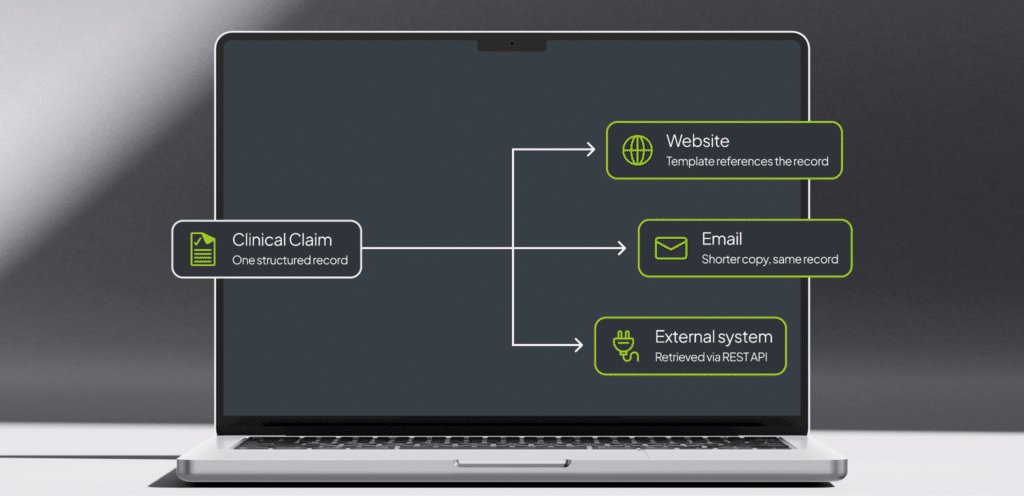
WordPress can reduce duplication by storing reusable information as its own content rather than embedding separate copies in every page or channel. Something like a clinical claim, for example, can be created as a structured content item with separate fields for the claim text, reference, approval code and expiry date. Taxonomies can identify the markets, brands or audiences it applies to.
A custom post type is one way to manage this in WordPress. It gives clinical claims, or other specific content, their own content type and editing interface. WordPress can also keep revisions of those records when revision support is enabled. The website does not then need another manually maintained version of the claim. A template, custom block or other component can reference the structured claim and render its current values. Other approved systems can retrieve the same content through the WordPress REST API, provided the content type and required fields have been configured for API access.
Instead of updating separate copies of the same claim in a publishing tool, portal and other connected system, the source content is updated in WordPress itself. Channel-specific versions can still exist where they are required. An email, for example, may need shorter copy than a website. The difference is that those versions can be linked to the same underlying content item rather than managed as unrelated content.
WordPress does not automatically record every page or external channel using a claim. If relationships between claims and the places they appear are stored explicitly, the platform can provide a record of those relationships. That makes it possible to identify affected content when a claim is changed or expires.
How does WordPress fit with existing pharma platforms such as DAM, CRM and MLR systems?
WordPress sits alongside existing pharma platforms rather than replacing them. An MLR platform still manages review and approval, but that review is enhanced through WordPress. A DAM can still manage approved assets, but publishing those assets across markets gets easier with WordPress. And a CRM can manage customer and engagement data, but connecting it to your WordPress domain provides a customizable and organization-specific experience.
Each of these specialist systems remain the source of truth for the information they manage, while WordPress acts as the content and experience layer that helps deliver that information to the right channels.
Can WordPress Multisite make new pharma website launches faster?
WordPress Multisite can make new brand or market sites launch faster because you’re building from an approved set of standards and guidelines. You’re simply rolling out a new site under the existing Multisite umbrella, instead of creating a new site and trying to connect it to your other domains.
Instead of configuring a new CMS for every site, teams can reuse approved themes, components, plugins, analytics, integrations and security standards across the network. The new site can then be configured for the specific brand or market rather than built from the ground up.
The most important change that needs to take place when changing to a Multisite architecture for omnichannel governance is conceptual. A traditional CMS model starts with the website then finishes with the content:
Create page → add content → publish page
An omnichannel content model starts with the content:
Create and govern content → organize it by brand, market and audience → deliver it to the appropriate channels
WordPress Multisite combines centralized platform management with separate sites for individual brands, markets and audiences. For pharma organizations, this expands the role WordPress can play beyond publishing individual websites and makes it a competitive advantage for omnichannel publishing.
Conclusion: WordPress Multisite as a Foundation for Omnichannel Delivery

Omnichannel delivery creates a straightforward challenge for pharma organizations: content needs to reach more channels without becoming harder to manage, govern or maintain. WordPress Multisite provides a shared platform for managing multiple brands, markets and digital properties. Structured content and APIs can then make selected information reusable beyond the website and easier for omnichannel publishing.
The result is less duplication, greater consistency, clearer governance and a platform better equipped to support the growing range of digital channels pharma organizations need to manage.
Build a more connected omnichannel content platform
Explore the enterprise WordPress solutions we build for complex, multi-market digital estates.
WordPress Multisite: Build and manage shared Multisite platforms across brands and markets all under a single installation.
Custom Integrations: Connect WordPress with your DAM, MLR, CRM, analytics, SSO and other business systems for complete visibility.
Multilingual Solutions: Manage connected content across languages, regions, markets and compliance regulations with MultilingualPress.
Website Relaunchs: Relaunch your new site for better omnichannel content publishing, cross-regional performance, and more detailed auditing.
Content Migration: Move URLs, metadata, assets and reusable content into a structured WordPress setup.
-
Multi-market compliance: what to require from your CMS
Managing multi-market becomes a lot harder when you’re dealing with fragmented systems across markets. Here’s what you should require from your CMS.
-
Why Enterprises Move to WordPress
Find out why enterprises and digital content teams choose WordPress for their global operations.
-
Digital Sovereignty in an Increasingly Dependent World
Digital sovereignty isn’t about removing third-party providers, but building an architecture that gives you the freedom to choose which providers you use.
Failed to submit:
one or more fields are invalid.