
Executive summary
Security is the first question raised in enterprise evaluations of WordPress, or any other CMS. This article answers questions around WordPress’s security through the OWASP Top 10, a globally recognized list of the most critical web application security risks, maintained by the Open Web Application Security Project (OWASP).
On its own, WordPress covers most of the list with security capabilities that ship out-of-the-box in the platform:
- roles and capabilities that define permissions down to individual actions and extend to network level on Multisite,
- prepared queries and output escaping against injection,
- multi-factor authentication with per-session tokens and revocable application passwords,
- checksum verification against the official release,
- and a split between error logging and error display that keeps file paths and database queries off a visitor’s error page.
Four categories fall outside of what a scanner can assess, these are:
- access control in practice,
- insecure design,
- authentication logic,
- and monitoring.
Those are settled by organizations during the design phase and confirmed during manual testing cycles, alongside continuous scanning for the fast-moving categories and dynamic testing against the running site. In short, WordPress security at enterprise scale is decided by how the platform is built, governed, tested, and monitored rather than by the platform itself.
Using the OWASP Top 10 provides a clear security structure and priorities list that, when followed, allows WordPress to be a highly secure, capable CMS for a wide range of enterprise applications.
Is WordPress secure for enterprise?
Security is one of the first questions raised when WordPress comes up in an enterprise platform evaluation. Being the world’s largest CMS also means that it’s more likely to attract scrutiny, negative assumptions and inaccurate preconceptions.
The OWASP (Open Worldwide Application Security Project) Top 10 provides a clear, measurable way to answer any questions you may have surrounding WordPress security. Working through the list with WordPress one security category at a time shows exactly what security capabilities the platform can be built to, and which it handles for you.
The security capabilities WordPress provides out-of-the-box
WordPress core is maintained by a dedicated security team that reviews vulnerability reports and coordinates responsible disclosure and fixes. The platform is open source, so contributors and security researchers around the world can read and audit it.
WordPress’s core security team patches vulnerabilities on a rapid, regular basis. And since 2013, WordPress has been delivering minor security releases as automatic background updates, so critical core fixes reach millions of sites within hours of publication without requiring an administrator to do anything.
The track record of core software security on WordPress is comprehensibly measurable. Patchstack, which maintains one of the main vulnerability databases for the WordPress ecosystem, recorded 7,966 vulnerabilities across the ecosystem in 2024. Seven of those, which were handled and closed through responsible disclosure, were in WordPress core (roughly 0.09%).
The remaining 99.9% of the vulnerabilities that were discovered were found in plugins and themes. This is the layer which sits on top of the core platform, and it’s the part of the platform that you, or your agency, select, govern, and update. It’s already very clear that WordPress core is a highly secure platform, but only when you have the right plugin and theme governance on top of it.
On top of core security features that come with the platform, WordPress gives you a mature permission model, a set of built-in functions for writing secure code, and, on enterprise-grade hosting, a hardened environment around all of it.
What the OWASP A01 to A10 numbering means
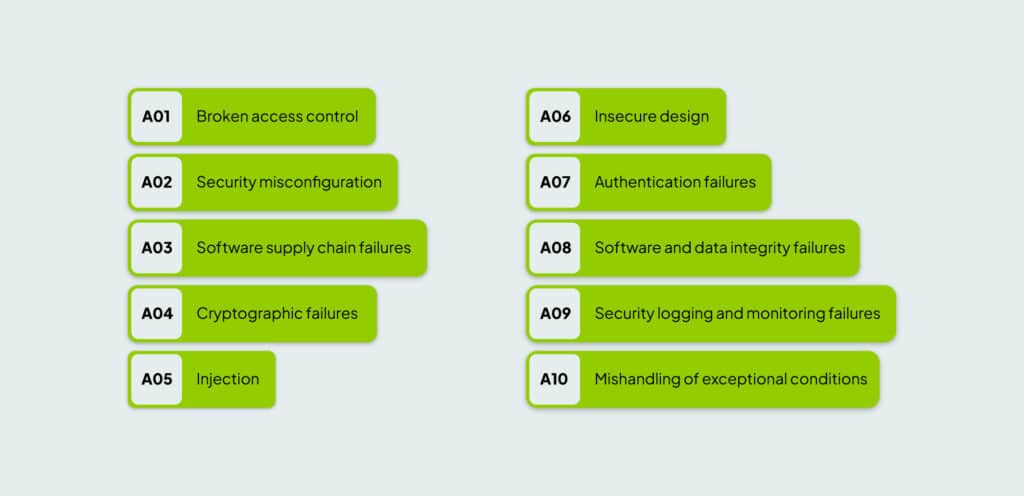
The category codes used throughout this article come from the OWASP Top 10 itself. OWASP is a non-profit that publishes free application security guidance, and the Top 10 is its best-known document. Each category on the list carries an identifier from A01 to A10, where the A marks it as an application security category and the number is that category’s rank on the list.
The ranking reflects how the OWASP team assesses each category, using data gathered from a large set of tested applications alongside a survey of security practitioners. The categories are ordered by a combination of how often the weakness appears in real applications, how easy it is to exploit, and how much damage it causes when it is exploited. This is why broken access control sits at A01 and server-side request forgery sits at A10.
Editions of the list are dated as well as numbered, so you will see the full identifiers written as A01:2025 through A10:2025. This article follows the 2025 edition throughout, which is the most recent version of the assessment.
Broken access control (A01)
Broken access control (A01) sits at the top of the OWASP list because it covers a user reaching data or actions above their level. WordPress handles this risk with its roles and capabilities system, which defines permissions down to individual actions.
The default roles, Administrator through Editor, Author, Contributor and Subscriber, are each a bundle of those capabilities. Publishing a post, installing a plugin and changing a site setting are separate permissions that are granted separately, and organizations can further tailor these roles to suit their operational needs.
Developers can check role permissions in code with a single call, current_user_can, before any sensitive action runs, and this check can be used to guard every REST API endpoint. Actions taken through forms and links carry a one-time token called a nonce, which prevents a request being forged on a logged-in user’s behalf.
On a Multisite estate, the model extends upward with network-level capabilities that only a Super Admin holds, so your central team can grant each market team exactly the control it needs to run its own site while keeping estate-wide settings out of reach and out of risk.
Server-side request forgery became part of this security category in 2025, having been a category of its own in the previous edition. It covers a site that is tricked into making requests it should not, often to reach systems inside your own network.
WordPress provides a safe method for making outbound requests with the WordPress HTTP API that validates the destination. Features that fetch an external URL are covered by the API, and developers rigorously test custom integrations, such as webhooks, payment gateways, and data importers, to prevent security issues. This process may involve dynamic testing to detect vulnerabilities in running applications and manual code reviews to ensure the use of secure WordPress functions.
Security misconfiguration (A02)
Security misconfiguration (A02) covers settings that should be locked down but are not, and it moved up to second place in 2025 because misconfigurations were more common in the contributed data than in the previous cycle.
Since server configuration happens mostly outside of WordPress, a well-governed WordPress estate gives you everything you need to pass this category through a wide assortment of security measures: debug mode off in production, correct file permissions, directory listing disabled, no exposed backup files, a current PHP version, and security headers such as Content Security Policy, X-Frame-Options and Strict-Transport-Security in place.
WordPress also provides hardening switches you set once in the site configuration. These include features like being able to disable the in-dashboard file editor so that a compromised login cannot rewrite site code, forcing the admin area over HTTPS.
And, in the rare case that configurations on an estate drift over time as sites/features are added or changed, automated scanning and health-check tools such as WP-CLI Doctor provide reliable drift detection and prevention.
Software supply chain failures (A03)
Software supply chain failures (A03) is the category that changed most in 2025. It grew out of vulnerable and outdated components, and it now covers the whole chain that code travels through before it reaches production:
- third-party dependencies and their own nested dependencies,
- build systems,
- developer tooling,
- artifact storage,
- and distribution infrastructure.
WordPress provides comprehensive information to work with at the dependency end of that code chain, because its extension layer is one of the most closely tracked in the industry.
Scanners such as WPScan maintain databases of tens of thousands of known plugin, theme and core vulnerabilities. It can check an entire estate for vulnerabilities in minutes, naming the exact component or version that needs attention. Plugins or themes that are found to include vulnerabilities are closed so that they can no longer be downloaded from within the WordPress admin, cutting off risk at the source.
Patchstack publishes a comparable scanning feed, and Wordfence runs a public bug bounty programme and reports known-bad code. WordPress has supported automatic updates for plugins and themes since version 5.5, so low-risk security patches land the moment they are published.
Core, plugin and theme updates from WordPress arrive from official repositories over secure connections. Developers can also quickly perform checksum verification so they can confirm that the files on a server match the official release, which is covered under A08 below.
The build end of the chain is where your own governance and security decisions carry the most weight, and an enterprise WordPress build gives you or your agency direct control over it. Managing plugins, themes, libraries and other packages as declared dependencies through Composer and npm puts every component and its exact version into version control.
This means that a change to an estate’s software list arrives as a reviewed pull request instead of a click in a dashboard. Having a clear list also gives you the input for a software bill of materials, which is what OWASP recommends for tracking direct and transitive dependencies.
Cryptographic failures (A04)
Cryptographic failures (A04) cover the protection of data in transit and at rest. On WordPress, cryptographic risk is mitigated by HTTPS enforcement across the estate, HTTP Strict Transport Security so browsers are prevented from falling back to an unencrypted connection, secure and HttpOnly flags set on cookies, and current SSL and TLS configuration.
Underneath those settings, WordPress signs the cookies that keep users logged in using a set of secret keys and salts defined in the site configuration file, which is why those values are treated as sensitive and rotated when needed.
However it’s important that credentials and API keys are kept out of version control and anywhere else they could be exposed. All of these are configuration decisions that WordPress can be built to support directly.
Injection (A05)
Injection (A05) covers SQL injection and cross-site scripting, and WordPress provides a well-developed toolkit for preventing both.
WordPress ships dedicated functions for preparing database queries safely, so that user input is never read as a command, and a full family of functions for sanitising input on the way in and escaping output on the way out, so that untrusted content cannot execute in a visitor’s browser. Code written to WordPress coding standards uses these functions by default and resists injection as a result.
Confirming that protection in a running site is the job of dynamic testing tools such as OWASP ZAP, which probe the site the way an attacker would, alongside manual review of any custom code built on top of the platform.
Insecure design (A06)
Insecure design (A06) covers the architecture itself, meaning the decisions made before anyone writes a line of code.
No scanner on any platform can assess whether an estate was designed with the right security patterns, sensible threat modelling, and the proper controls built in from the start. The reach of a compromised account, the separation between a customer-facing area and an internal one, and the placement of trust boundaries are all architectural decisions. They’re decided by the people who build your platform, which is why choosing the right agency or team is essential to ensuring a securely designed website.
Building an enterprise WordPress estate with a team that has designed estates of a similar size and complexity before is a generally failsafe way to prevent insecure design from becoming part of your web design.
Authentication failures (A07)
Authentication failures (A07) cover login and session security, and WordPress supports a full set of controls in this category:
- multi-factor authentication,
- login attempt limiting,
- session management,
- and enforced password strength, with a password generator built into the user interface.
WordPress never stores passwords in plain text, it hashes them with a strong one-way algorithm, and it issues every logged-in session its own token. When a system or an integration needs programmatic access, application passwords give that system its own revocable credential instead of a real user’s password. Enterprise-grade builds commonly add single sign-on and stricter password and session policies on top of these controls.
Access control and authentication both need human testing as well as scanning. An automated tool can confirm that a login page exists and that multi-factor authentication is switched on. But a person is needed to confirm that an editor cannot reach an administrator’s actions or that a password reset flow cannot be hijacked.
Manual testing of these boundaries is standard practice on a well-run enterprise estate, and it is the most reliable way to show that the permissions you configured are the permissions actually being enforced.
Software and data integrity failures (A08)
Software or data integrity failures (A08) cover the question of whether the code running on your site is reliable and dependable.
WordPress ships core with checksum verification against an official reference. A single command can confirm whether any core file has been altered, and plugin and theme integrity can be checked the same way. WordPress also delivers updates from trusted, signed sources rather than arbitrary locations. Combined with a disciplined deployment process, checksum verification gives you a way to prove the state of your estate.
Security logging and monitoring failures (A09)
Security logging and alerting failures (A09) cover whether you would see a problem while it was still happening, and OWASP renamed the category in 2025 to put the emphasis on alerting, because logs that nobody is told about do little to shorten an incident.
Through authorized plugins, your WordPress domain can be built to support detailed activity logging, audit trails that record which user changed what and when, file-change detection, and alerting. Enterprise hosting also adds monitoring around the surrounding infrastructure. The platform provides the capability, and the value comes from the governance decisions and strategy built to maximize that capability.
Mishandling of exceptional conditions (A10)
Mishandling of exceptional conditions (A10) is new to the list in 2025, and it covers what an application does when something goes wrong:
- Error messages that leak server or database details to whoever caused the error.
- Processes that get cut off halfway, leaving data in a broken, half-updated state.
- Security checks that fail the wrong way, letting a request through instead of blocking it.
OWASP added this category because these are root causes sitting underneath other vulnerabilities and not simply a form of attack in their own right. WordPress separates error reporting from error display, providing central control in this risk category. The WP_DEBUG_DISPLAY constant governs whether PHP and database errors are printed to the page, and WP_DEBUG_LOG sends the same information to a log file instead.
On a production site you set display off and logging on, so your developers keep the detail they need for diagnosis and a visitor who triggers an error never sees a file path, a database query, or a plugin name. WordPress also supports a custom database error page through a drop-in file, so a database problem can return a page you designed instead of a raw connection error.
When a plugin or theme triggers a fatal error, WordPress can be built to pause the extension responsible. It can then serve a plain message in place of the broken page, and email the site administrator a link that opens the admin area in recovery mode for more efficient fixing workflows.
Your site stays up and under control while that work happens, and on a Multisite estate the failure stays with the site that caused it instead of spreading through your network. Centralized error handling is confirmed at code review, and dynamic testing pushes the running site into error states to check that it responds the way it should.
How these security layers work together on WordPress

Automated, dynamic and manual testing on a WordPress estate provide enough coverage to manage the security of the entire estate. Using these three different testing protocols together is an effective way to de-risk your estate.
Automated scanning runs continuously and covers the fast-moving categories: known vulnerable components, misconfiguration, and a first pass at injection. Dynamic testing exercises the running site and confirms that the code holds up in practice. Manual testing by experienced people covers the categories that call for judgement, which are access control, insecure design, authentication logic, and monitoring.
Each of these security layers cover the Top 10, with overlap across the three of them. Running all three together gives you coverage across the whole list. If you are assessing WordPress for an enterprise build, the OWASP Top 10 gives you a clear approach to addressing WordPress security concerns.
How is access control tested beyond an automated scan? How is the architecture reviewed for insecure design? How is component scanning kept continuous? How is monitoring set up so that an issue is caught while it is in progress? WordPress has a specific answer for every category on the list, and a team that can walk you through those answers is a team that’s able to deliver the security and governance you need to run an exceptionally secure enterprise estate.
Strengthen your digital security with our enterprise WordPress solutions.
We use to build and maintain secure WordPress platforms for enterprises and multi-market organisations. Explore our services below.
WordPress for Enterprise: Multisite architecture and governance to manage security across your entire estate, no matter how many websites you’re running.
Multilingual WordPress Solutions: MultilingualPress, the second most-used plugin on WordPress VIP, provides accurate, AI-powered translations across your markets.
Quality Assurance: QA covering the security checks scanners can, and can’t, make.
Stakeholder Alignment: Get your markets and leadership behind your security governance initiatives.
Custom Integrations: CRM, ERP, analytics and SSO connections built with credentials outside the codebase and each system holding its own revocable access.
Maintenance & Support: Continuous scanning, patching, and monitoring after launch.
Ready to hold your WordPress estate to the same standard as the rest of your stack? Contact Syde.
Related Articles
-
Digital Sovereignty in an Increasingly Dependent World
Digital sovereignty isn’t about removing third-party providers, but building an architecture that gives you the freedom to choose which providers you use.
-
PaaS vs Self-Hosted WordPress: What You Should Know
Choosing between a managed PaaS environment and a self-hosted WordPress setup is one of the more consequential decisions a digital team can make.
-
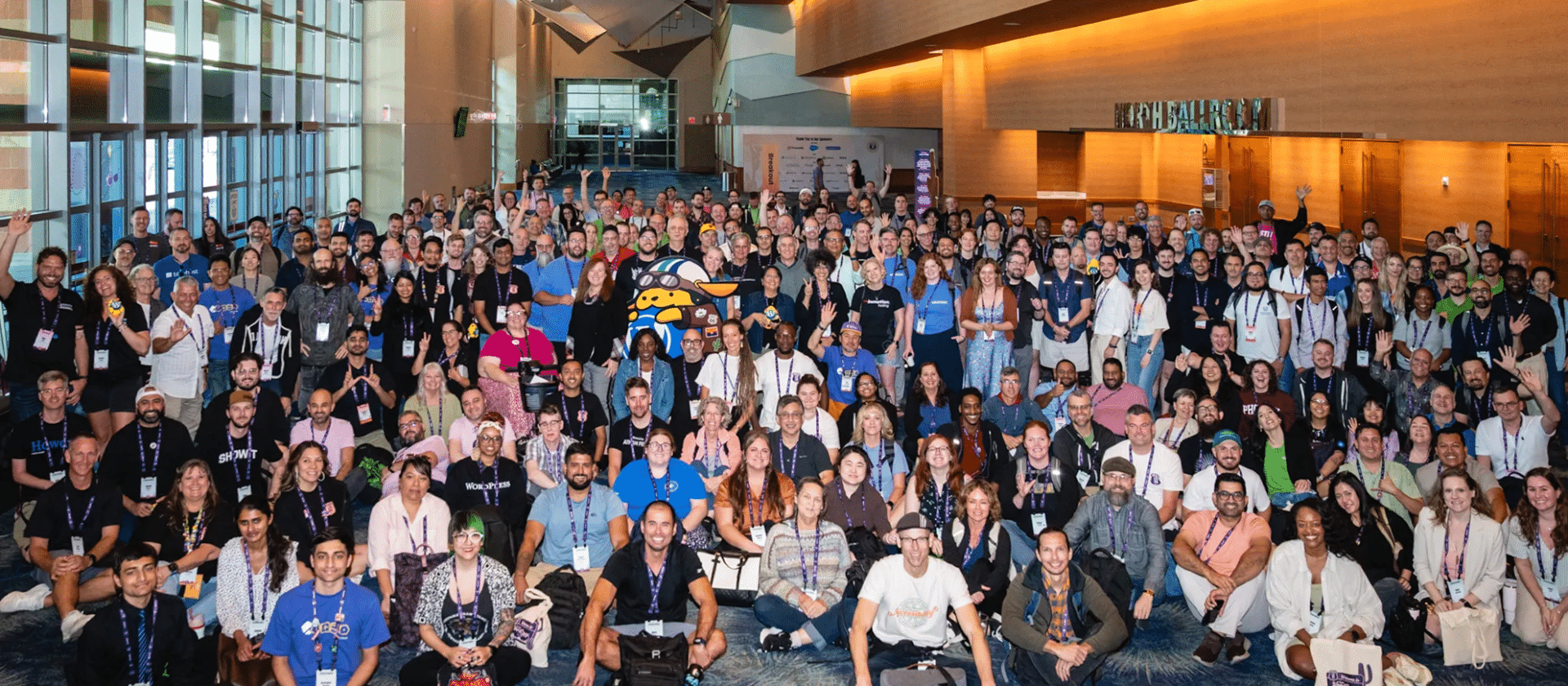
WordCamp US 2026 Recap
4 Days packed with lots of great talks, lots of great people, and lots of not so great heat. Phoenix was a blast!
Failed to submit:
one or more fields are invalid.